


Close Menu
  • Home
  • Articles
    • Attacks
      • BEC
      • Data Breach
      • DDoS
      • Evasion Attacks
      • Injection
      • Malware
      • MITM
      • Phishing
      • Ransomware
      • RCE
      • Social Engineering
      • Spoofing
      • Spyware
    • Business and Policy
      • BCP and DRP
      • GRC
      • Regulations
    • Data Protection
      • DLP
      • DRM
      • Encryption
      • IAM
    • Future, Trends and Insight
      • AI
      • Events & Community
      • Emerging Tech
      • Expert Panel
      • Interviews With Experts
      • Insights
      • Study & Research
    • Resources
      • Guides
      • Tools
      • Training & Education
    • Security
      • API
      • Apps
      • Cloud
      • Critical Infrastructure
      • Endpoint
      • Hardware
      • IoT
      • Mobile
      • Network
      • OT
      • Port Security
      • Security Architecture
      • Software Development
      • Supply Chain
      • Zero Trust
    • Threats and Vulnerabilities
      • Emerging Threats
      • Insider Threats
      • Risk Management
      • Threat Intelligence
      • Zero Day
  • News and Exclusives
    • Latest News
    • ISB Exclusive
    • Positive News
  • Who We Are
    • About Us
    • Information Security Buzz Expert Panel​
    • Write for Us
    • Media Pack
  • Contact Us
  • Newsletter
Facebook X (Twitter) LinkedIn
Information Security BuzzInformation Security Buzz
  • Home
  • Articles
    • Attacks
      • BEC
      • Data Breach
      • DDoS
      • Evasion Attacks
      • Injection
      • Malware
      • MITM
      • Phishing
      • Ransomware
      • RCE
      • Social Engineering
      • Spoofing
      • Spyware
    • Business and Policy
      • BCP and DRP
      • GRC
      • Regulations
    • Data Protection
      • DLP
      • DRM
      • Encryption
      • IAM
    • Future, Trends and Insight
      • AI
      • Events & Community
      • Emerging Tech
      • Expert Panel
      • Interviews With Experts
      • Insights
      • Study & Research
    • Resources
      • Guides
      • Tools
      • Training & Education
    • Security
      • API
      • Apps
      • Cloud
      • Critical Infrastructure
      • Endpoint
      • Hardware
      • IoT
      • Mobile
      • Network
      • OT
      • Port Security
      • Security Architecture
      • Software Development
      • Supply Chain
      • Zero Trust
    • Threats and Vulnerabilities
      • Emerging Threats
      • Insider Threats
      • Risk Management
      • Threat Intelligence
      • Zero Day
  • News and Exclusives
    • Latest News
    • ISB Exclusive
    • Positive News
  • Who We Are
    • About Us
    • Information Security Buzz Expert Panel​
    • Write for Us
    • Media Pack
  • Contact Us
  • Newsletter
Subscribe
Information Security BuzzInformation Security Buzz
Home - Articles - Rebecca Herold – Red-Flag Warning Signs To Spot The Fakes
Articles

Rebecca Herold – Red-Flag Warning Signs To Spot The Fakes

ISBuzz TeamBy ISBuzz TeamJanuary 20, 2014Updated:January 20, 20144 Mins Read
Share LinkedIn Twitter Facebook Copy Link Email
rebecca prof
Share
Facebook Twitter LinkedIn Email Copy Link
Quick AI Summary
ChatGPTClaudeGeminiGrokPerplexityDeepSeekCopilot

What are your top 3 tips to help others avoid phishing scams?

The holiday season was also a popular phishing season. There was an upward spike in the number of emails I received that were trying to scam me.  Here are a couple of them, and some of the characteristics that tipped me off to their deception.

You’re Not Costco!

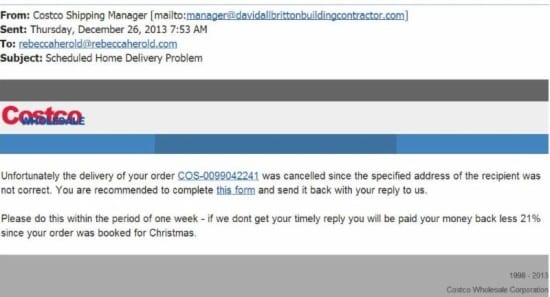
Phishing fraudsters popped their heads into my email inbox hoping to fool me into clicking their links. Had I not known the warning signs of a fraudulent email, I may have done exactly that. Here is a screenshot of the email.
Costco


Red-flag warning signs that helped me spot this as a fake:

– The sender’s address is from a domain that is not Costco’s.

– I am a Costco member, and I noticed the order number is not the same format as what they use.

– Although the domain (davidallbrittonbuildingcontractor.com) actually exists, the business does not have any type of product or service I would have purchased.

– The Costco representative I called said they would never send a message like this, and that they don’t do business with this particular vendor. (NOTE: I tried contacting the business to let him know it appears his email server has been compromised, but so far I’ve not heard back from him.)

– The Costco logo is a little different than the one on the official Costco website.

– There are no details about the alleged order (no order date; no list of the items ordered).

– There are misspellings.

– The 21-percent refund reduction is ludicrous (If something sounds fishy, that’s because it usually is.)

Whose Court?

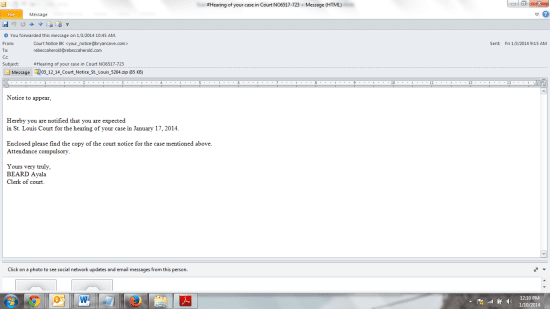
A few days later I then got this message:
Court 1


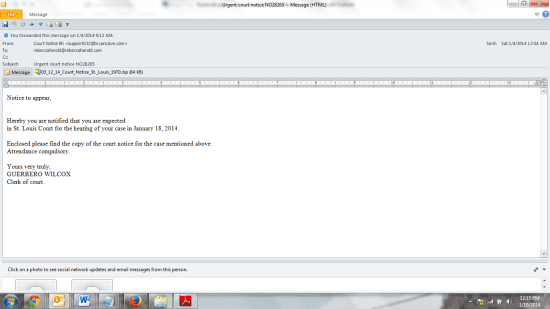
The next day I got another notice, from a different email address from the same domain, and the name of the clerk of court had changed:
Court 2


Phishers will often re-send their bogus message more than once if the targeted victim did not react the first (or second or third) time.  They will often change the sender’s email address, or the name in the message, in case that had blocked the message from being delivered based upon the settings of the spam filter.

Other red-flag warning signs that helped me spot these as a fakes:

– I live in Iowa, not St. Louis, Missouri or Illinois. Or any other St. Louis, for that matter. It just did not make sense.

– I’ve not been to St. Louis recently.

– I’ve not been involved in any situation that would require me to be to go to a court.

– Phishers often use attachments; especially zip containers, to deliver their malware.

– The date on the zip container is different from the indicated court date.

– The email is not from a government domain, which would be where communications from such agencies would come from.

– The names in all caps would not be typical of a government message.

What to do

If you receive an email with these types of warning signs and/or others, do not click any links. If you receive it in your work email, consider forwarding it to the person responsible for information security within your organization. That individual can then check it out and determine how to appropriately warn others in your organization to be on the lookout for similar phishing attempts.

Rebecca Herold | The Privacy Professor | @PrivacyProf

To find out more about our panel members visit the biographies page.

ISBuzz Team
  • ISBuzz Team
    Air Canada Data Breach: BianLian Extortion Group Claims A Massive Heist Contrary To Airline’s Earlier Statement
  • ISBuzz Team
    Unprecedented DDoS Attack Rocks The Web: Tech Giants Reveal A Digital Tsunami
  • ISBuzz Team
    CISA Flags High-Severity Adobe Acrobat Reader Flaw Amid Active Exploits
  • ISBuzz Team
    Curl Security Alert: Patching A Critical Bug Averting Potential Cyber Catastrophe

The opinions expressed in this post belong to the individual contributors and do not necessarily reflect the views of Information Security Buzz.

Share. Facebook Twitter LinkedIn Email Copy Link

Related Posts

New Phishing Kit Starkiller Defeats Multi-Factor Authentication

February 23, 20264 Mins Read

ReliaQuest Uncovers Social Media Phishing Campaign Built on Trusted Tools

January 22, 20266 Mins Read

What Happens after a Phishing Email Lands in Your Inbox?

January 5, 20266 Mins Read
ISB-Bora-Side-Bar

No se ha podido establecer conexión. Error 429

 
ISB-Bora-Side-Bar
Black ISB Logo

Information Security Buzz is an independent resource that provides the experts’ comments, analysis, and opinion on the latest Cybersecurity news and topics

X (Twitter) LinkedIn Facebook RSS

Working With Us

  • About Us
  • Advertise With Us
  • Contact Us

Write For Us

  • How To Contribute

The Pages

  • Privacy Policy
  • Cookie Policy
  • AI Policy
  • Terms & Conditions
  • Copyright Notice

Information Security Buzz and all its contents are copyright © 2014-2025. All rights reserved. All third-party trademarks are recognized.

Type above and press Enter to search. Press Esc to cancel.

Manage Consent
To provide the best experiences, we use technologies like cookies to store and/or access device information. Consenting to these technologies will allow us to process data such as browsing behavior or unique IDs on this site. Not consenting or withdrawing consent, may adversely affect certain features and functions.
Functional Always active
The technical storage or access is strictly necessary for the legitimate purpose of enabling the use of a specific service explicitly requested by the subscriber or user, or for the sole purpose of carrying out the transmission of a communication over an electronic communications network.
Preferences
The technical storage or access is necessary for the legitimate purpose of storing preferences that are not requested by the subscriber or user.
Statistics
The technical storage or access that is used exclusively for statistical purposes. The technical storage or access that is used exclusively for anonymous statistical purposes. Without a subpoena, voluntary compliance on the part of your Internet Service Provider, or additional records from a third party, information stored or retrieved for this purpose alone cannot usually be used to identify you.
Marketing
The technical storage or access is required to create user profiles to send advertising, or to track the user on a website or across several websites for similar marketing purposes.
  • Manage options
  • Manage services
  • Manage {vendor_count} vendors
  • Read more about these purposes
View preferences
  • {title}
  • {title}
  • {title}